


What is AI? - Development & Advancement
People have been talking about artificial intelligence (AI) for more than 50 years. In the beginning, it meant that computers were able to take over the work and decisions of humans. It was therefore initially algorithmic intelligence. It was about analyzing data and improving decisions. With images and image recognition, it's about recognizing patterns. The European Parliament defines artificial intelligence this way: "Artificial intelligence is the ability of a machine to imitate human abilities such as reasoning, learning, planning and creativity." The institution distinguishes between software and embedded intelligence. In software, it mentions virtual assistants, image analysis software, search engines, speech and facial recognition systems. "Embedded" is about robots, autonomous cars, drones, applications of the "Internet of Things."
There are currently, in the result of the development push by Chat-GPT3, an enormous number of studies that predict possible changes. The authors of a McKinsey study on AI say that generative AI will account for three quarters of the estimated productivity growth in the areas of customer service, marketing, sales, software development, and research and development.
This is exactly what we at EIKONA Media are also looking at: how can you be more productive by integrating elements of Artificial Intelligence into our TESSA DAM for you.
Which AI does a DAM use?
A DAM software is used to manage assets - images, graphics, documents and other types of files. Files are integrated into a DAM, processed in the DAM, and placed in following processes in as automated a manner as possible. To accomplish this, files are analyzed using simpler and more complex algorithms. In the simple case, it is metadata that is read out of the file to make it searchable later. In addition, elements or patterns can be detected or files can be transformed. Let's take a look at this in detail:
Meta data
The term "meta" comes from the Greek and means "about". Metadata is therefore data about data. This metadata determines the properties of a data object. In the case of Digital Asset Management (DAM), the properties of an asset - that is, a file. We use data that
- are contained in the file
- is created by storing it in the DAM
- added manually
- determined by artificial intelligence or
- originate from the link with a PIM system.
Object Recognition & Tagging
What already goes far beyond the extraction of data from a file is the recognition of objects. This involves patterns that are recognized in a graphics file and to which one or more tags are assigned via the process of recognition. This method was originally developed in the field of robotics. For example, a robot has to recognize where it has to place a weld seam. You probably know from crime stories that there is such a thing as facial recognition. That was an initial field of application for object recognition in professional handling of images and automatic object recognition by artificial intelligence. Later, the big social networks had to put in filters to be able to filter, for example, sexual depictions or depictions of violence. Using humans would not be fast enough with the amount of data, so AI had to take over these tasks.
So now we can use tools that recognize objects in photos, we can recognize what animals are in a photo, what season it is, and much more. The recognized objects are translated into tags and this makes them searchable for you in the DAM. At EIKONA Media, we started using Google's object recognition technology relatively early on, in 2019. We have already explained an example of tagging with the Google Cloud Visions API in another place. In TESSA DAM, you can then search for automatically keyworded action, mood or ambience photos. The advantage here is that the AI does the job much more extensively and accurately than humans.
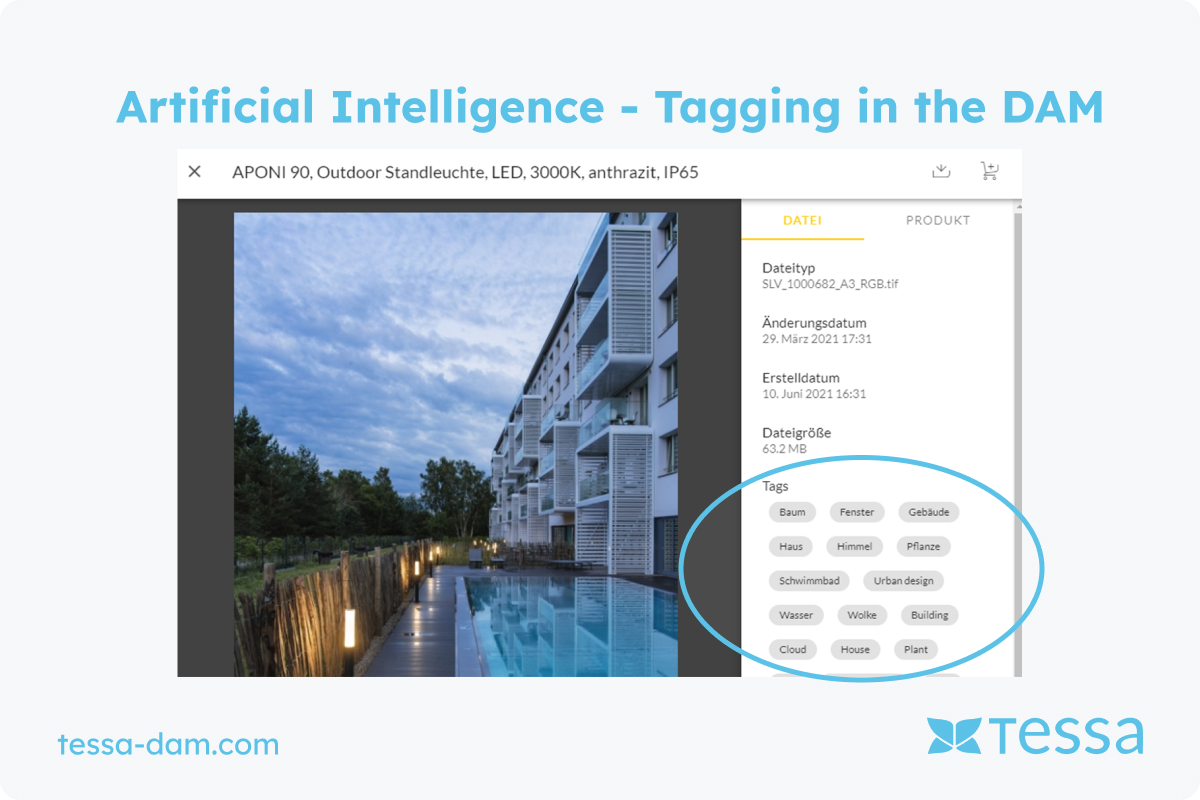
There are now many more modern tools that we use and that you can access via the TESSA DAM. In the first step, i.e., the keyword assignment described above, the image is sent to the AI and the DAM receives keywords in return. This means you can only find something for which a keyword already exists. With our new technology, you can also search for terms that have not yet been associated with a specific image. This is particulary helpful in creative processes because you can access the TESSA DAM directly with Adobe products. Creatives can therefore work with it without leaving their familiar working environment.
Automatic cropping & placement
If you're a retailer, you probably know the challenge: manufacturers send you product photos with different amounts of white space. What's not such a tragedy with a single photo and on a product detail page, looks unattractive on product overview pages because the featured objects - clothing, electronics, vehicles, etc. - are displayed unevenly. The effort to touch each photo individually to correct this inconvenience would be enormous. That's why we developed an Auto Crop for our TESSA DAM - an algorithm that automatically sets the picture frame at the distance you want. All you have to do is tell us the distance from the edge of the image or the position you want. What we can also do in this process: place other graphics or integrate watermarks into your photos.
Clearance & paths
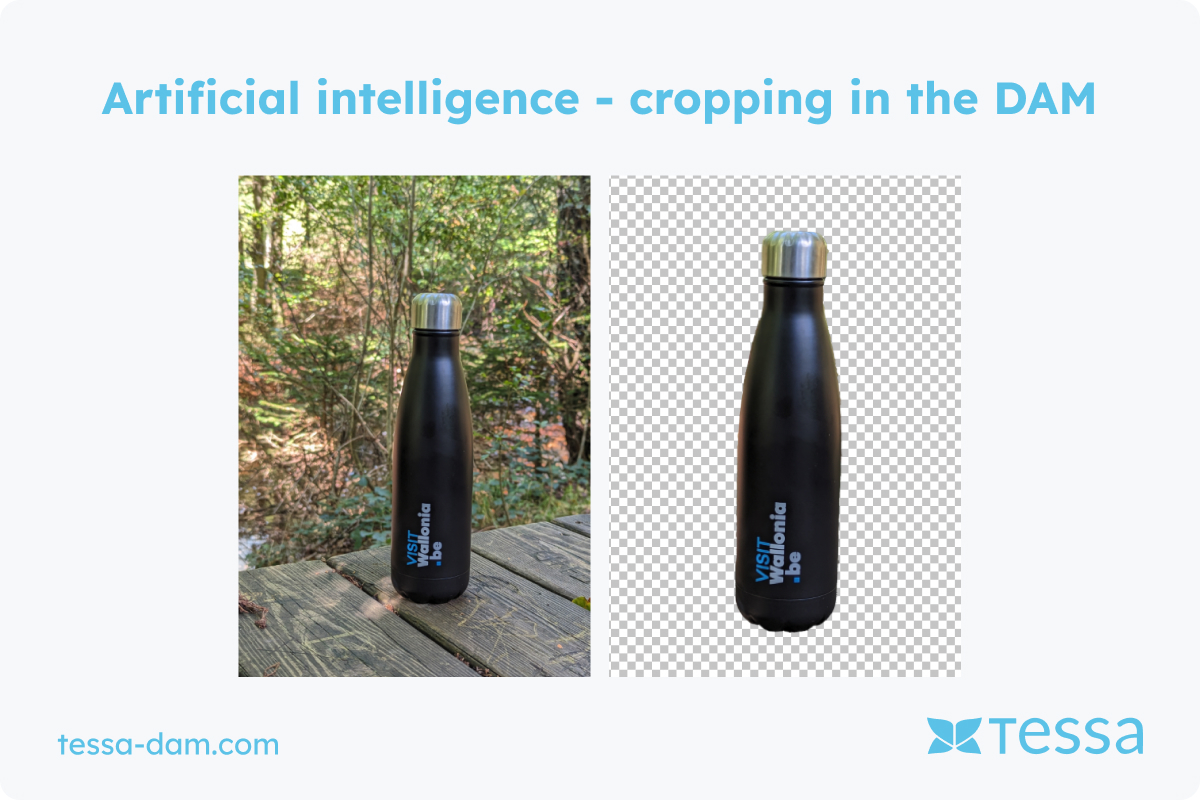
If you are an e-commerce merchant and want to work with something other than the visual default - that is, the white background on which the product is placed - this is a challenge. In this case, the photos need clippings, paths, or alpha channels around the object. In the past, this was laborious and manual work, even if it became easier with the help of Photoshop. Integrating cropping for lots of products in photos was difficult. Artificial intelligence helps at this point, too. The AI in TESSA DAM recognizes the object and creates a cropped image in your photos, so you can place the product in front of any background. In this way, AI gives you a tool to work creatively and stand out from the competition.
Compression & resizing
Since this is a basic requirement of graphics software, we wouldn't even talk about AI in this case. However, if we look at the definition of the European Parliament, the algorithms we have integrated into the TESSA DAM for this purpose are Artificial Intelligence.
The TESSA DAM is able to compress assets and play them out through channels in the size and shape that you ask for. Important: Zooming in on pixel graphics doesn't really work well, and even with the help of AI, it's not possible to do it as much as it's often shown in crime stories. But zoom out, zoom in a bit and compress is possible with the TESSA DAM.
You can find a detailed AI function overview in the TESSA DAM here.
Which AI should you not use in a DAM?
As the name suggests, a DAM is used to manage assets, i.e., images, videos, and documents. It is expressly not intended for creating new content. And that is an important point, especially when it comes to AI in DAM.
Yes, there are simple, clearly defined cases in which AI can be used effectively within a DAM. For example, for automatically inserting watermarks or enriching images with product information. Think of icons for product features that are integrated into images based on rules.
The creative framework is always clearly defined. AI in DAM takes on monotonous, repetitive tasks. It works, it does not make decisions on its own. This is precisely where the line is drawn: a DAM is not a creative actor. As soon as AI is expected to be creative on its own, you leave the realm of sensible DAM use.
AI does not turn a DAM into an asset creation tool
Theoretically, a generative AI tool such as DALL·E, Adobe Firefly, Midjourney, Stable Diffusion, or Google's Gemini (Imagen) could be connected to a DAM via an API. The tool receives data from DAM and PIM, automatically generates multiple images, and stores them again. Sounds convenient at first.
But then comes the crucial question: Which image is the right one?
Which one goes live? Who adjusts details if something is wrong? Who assesses style, context, and brand fit?
These decisions cannot currently be automated in a meaningful way. From our point of view, it is much more efficient, at least in the medium term, to work directly in the respective creative tool. There, you consciously select the best result and save exactly that in the DAM. Especially since generative AI tools have very different strengths, weaknesses, and focuses. A one-size-fits-all solution in the DAM would not do justice to this reality.
AI does not turn a DAM into a creative tool
Ask a graphic designer which tool they use for creative work. The answer will almost always be Photoshop. Perhaps supplemented by Illustrator or InDesign. A DAM plays no role in this phase, and for good reason.
Retouching, compositing, color grading, or complex image editing require precise control. Of course, AI functions are used in this process. But always under human supervision and within a specialized tool. AI that works independently at the pixel level in a DAM is neither useful nor desirable today.
The greatest added value of a DAM for creative professionals therefore lies elsewhere: in integration. When graphic designers can access the DAM directly from Photoshop, they benefit enormously. AI-supported search, keywords, similarity search, all of this saves time without interfering with creative decisions. That's what our Photoshop plug-in is for.
The situation is similar with video and motion capture. AI can now generate entire clips. But as soon as fine-tuning is required, there is a lack of editable layers, timelines, and details. Without this control, the results are not usable for professional workflows.
A DAM does not use AI to decide which image is displayed on your website
In e-commerce in particular, performance marketing is heavily dependent on target groups. Different images for different users are standard practice. However, the decision as to which image is displayed and when should not be made by AI in a DAM.
A DAM is too far removed from the actual display location. This logic belongs in the front end or in specialized marketing tools. Of course, the DAM can tag and structure images. But here, too, control is crucial.
Fully automated, autonomous AI decisions in the DAM are risky. If platforms such as Google or Meta offer corresponding AI functions and you actively enable them, this is a conscious decision within these systems. This responsibility should not be outsourced to a DAM.
Conclusion
Artificial intelligence creates productivity
That's what the McKinsey study says, too. It is the same in the field of digital asset management. You can map functions by using the TESSA DAM that would be impossible to manage efficiently without AI - such as tagging objects, finding assets easily, cropping or transforming. In this case, AI performs tasks similar to what machines and robots have been doing for 50 years in the field of factory automation. However, generative AI (AI that creates new images and movies) is also coming into the visual communication field. DAM systems will not be able to do such tasks themselves. However, they will be able to provide basic material via API, control the machine that generates the visual material, and make the results accessible in a structured way in the DAM.


